



Aşağıda resimli gösterimi takip edersiniz hemen anlarsınız zaten basit birşey...


Kod: Tümünü seç
#!/usr/bin/env bash
export LANG=tr_TR.UTF-8
export LC_ALL=tr_TR.UTF-8
set -euo pipefail

# ---------------------------------------------------------------
# create-ico.sh  --  Raster image converter (PNG/JPG -> ICO/PNG/SVG)
# Input  : local path OR remote URL  (.png / .jpg / .jpeg)
# Output : .ico  /  .png  /  .svg
# ---------------------------------------------------------------

AVAILABLE_SIZES=(16 32 48 64 128 256 512)

# ---------------------------------------------------------------
# Tool availability
# ---------------------------------------------------------------
has_tool() { command -v "$1" >/dev/null 2>&1; }

HAS_CONVERT=false ; has_tool convert  && HAS_CONVERT=true
HAS_ICOTOOL=false ; has_tool icotool  && HAS_ICOTOOL=true
HAS_INKSCAPE=false; has_tool inkscape && HAS_INKSCAPE=true
HAS_WGET=false    ; has_tool wget     && HAS_WGET=true
HAS_CURL=false    ; has_tool curl     && HAS_CURL=true
HAS_FILE=false    ; has_tool file     && HAS_FILE=true

if ! $HAS_CONVERT; then
    echo "ERROR: ImageMagick 'convert' not found."
    echo "       Install: sudo apt install imagemagick"
    read -rp $'\nPress ENTER to exit.' _
    exit 5
fi

# ---------------------------------------------------------------
# Temporary workspace  (created early so download can use it)
# ---------------------------------------------------------------
TMP_DIR=$(mktemp -d)
trap 'rm -rf "$TMP_DIR"' EXIT

# ---------------------------------------------------------------
# Input: local path OR remote URL
# ---------------------------------------------------------------
echo ""
echo "Input source:"
echo "  Local  ->  /home/linuxmaster/icon.png"
echo "  Remote ->  https://example.com/icon.png"
echo ""
read -rp "Image path or URL (.png / .jpg / .jpeg): " SRC_RAW
SRC_RAW=$(echo "$SRC_RAW" | xargs)

SRC=""
DOWNLOADED_FILE=""

if [[ "$SRC_RAW" =~ ^https?:// ]]; then
    # ---- Remote URL: download to TMP_DIR ----
    if ! $HAS_WGET && ! $HAS_CURL; then
        echo "ERROR: wget or curl required for URL downloads."
        echo "       Install: sudo apt install wget"
        read -rp $'\nPress ENTER to exit.' _
        exit 12
    fi

    # Extract filename from URL (strip query string)
    URL_BASENAME=$(basename "${SRC_RAW%%\?*}")
    [[ -z "$URL_BASENAME" || "$URL_BASENAME" == "/" ]] && URL_BASENAME="download"

    DOWNLOADED_FILE="$TMP_DIR/$URL_BASENAME"
    echo ""
    echo "Downloading: $SRC_RAW"

    DL_OK=false
    if $HAS_WGET; then
        wget --quiet --show-progress --timeout=30 --tries=3 \
             -O "$DOWNLOADED_FILE" "$SRC_RAW" && DL_OK=true
    else
        curl --silent --show-error --max-time 30 --retry 3 -L \
             -o "$DOWNLOADED_FILE" "$SRC_RAW" && DL_OK=true
    fi

    if ! $DL_OK || [ ! -s "$DOWNLOADED_FILE" ]; then
        echo "ERROR: Download failed or received an empty file."
        echo "       URL: $SRC_RAW"
        read -rp $'\nPress ENTER to exit.' _
        exit 13
    fi

    echo "Saved to: $DOWNLOADED_FILE"
    SRC="$DOWNLOADED_FILE"

else
    # ---- Local path ----
    SRC="$SRC_RAW"
    if [ ! -f "$SRC" ]; then
        echo "ERROR: File not found: $SRC"
        read -rp $'\nPress ENTER to exit.' _
        exit 2
    fi
fi

# ---------------------------------------------------------------
# Format validation (extension first, MIME fallback for URLs)
# ---------------------------------------------------------------
SRC_EXT="${SRC##*.}"
SRC_EXT_LOWER="${SRC_EXT,,}"
FORMAT_OK=false

case "$SRC_EXT_LOWER" in
    png|jpg|jpeg) FORMAT_OK=true ;;
esac

# MIME fallback: useful when URL has no recognizable extension
if ! $FORMAT_OK && $HAS_FILE; then
    MIME=$(file --brief --mime-type "$SRC" 2>/dev/null || true)
    case "$MIME" in
        image/png)  SRC_EXT_LOWER="png";  FORMAT_OK=true ;;
        image/jpeg) SRC_EXT_LOWER="jpg";  FORMAT_OK=true ;;
    esac
fi

if ! $FORMAT_OK; then
    echo "ERROR: Unsupported or unrecognized image format."
    echo "       Accepted: png, jpg, jpeg"
    if $HAS_FILE; then
        echo "       Detected MIME: $(file --brief --mime-type "$SRC" 2>/dev/null || echo 'unknown')"
    fi
    read -rp $'\nPress ENTER to exit.' _
    exit 3
fi

# ---------------------------------------------------------------
# Output format
# ---------------------------------------------------------------
echo ""
echo "Output format:"
echo "  1) ICO  (.ico)"
echo "  2) PNG  (.png)"
echo "  3) SVG  (.svg)"
echo ""
read -rp "Select output format [1-3]: " FMT_SEL

case "$FMT_SEL" in
    1) OUT_FMT="ico" ;;
    2) OUT_FMT="png" ;;
    3) OUT_FMT="svg" ;;
    *)
        echo "ERROR: Invalid selection. Must be 1, 2, or 3."
        read -rp $'\nPress ENTER to exit.' _
        exit 6
        ;;
esac

# ---------------------------------------------------------------
# Output directory
# ---------------------------------------------------------------
echo ""
echo "Output directory (full path):"
echo "  Example: /home/linuxmaster/Desktop"
echo "  Leave blank to use current directory: $(pwd)"
echo ""
read -rp "Save to directory: " OUT_DIR
OUT_DIR=$(echo "$OUT_DIR" | xargs)

# Blank -> current working directory
if [[ -z "$OUT_DIR" ]]; then
    OUT_DIR="$(pwd)"
fi

# Expand ~ if user typed ~/...
OUT_DIR="${OUT_DIR/#\~/$HOME}"

# Check directory exists; offer to create if not
if [ ! -d "$OUT_DIR" ]; then
    read -rp "Directory does not exist. Create it? [y/N]: " MKDIR_CONFIRM
    if [[ "${MKDIR_CONFIRM,,}" == "y" ]]; then
        mkdir -p "$OUT_DIR"
        echo "Created: $OUT_DIR"
    else
        echo "ERROR: Output directory does not exist: $OUT_DIR"
        read -rp $'\nPress ENTER to exit.' _
        exit 14
    fi
fi

# ---------------------------------------------------------------
# Output filename
# ---------------------------------------------------------------
DEFAULT_NAME="output.${OUT_FMT}"
echo ""
read -rp "Output filename (default: ${DEFAULT_NAME}): " OUT_NAME
OUT_NAME="${OUT_NAME:-$DEFAULT_NAME}"
OUT_NAME=$(echo "$OUT_NAME" | xargs)

# Strip any path separators the user may have accidentally typed
OUT_NAME=$(basename "$OUT_NAME")

# Ensure correct extension
GIVEN_EXT="${OUT_NAME##*.}"
if [[ "${GIVEN_EXT,,}" != "$OUT_FMT" ]]; then
    OUT_NAME="${OUT_NAME}.${OUT_FMT}"
fi

# Final full output path
OUT="${OUT_DIR}/${OUT_NAME}"

echo ""
echo "Output path: $OUT"

# ---------------------------------------------------------------
# White background removal
# ---------------------------------------------------------------
echo ""
echo "Remove white background (make transparent)?"
echo "  Applies to all output formats. Uses 15% fuzz for anti-aliasing edges."
echo ""
read -rp "Remove white background? [y/N]: " WB_ANSWER
WB_ANSWER=$(echo "$WB_ANSWER" | xargs)
REMOVE_WHITE="no"
if [[ "${WB_ANSWER,,}" == "y" ]]; then
    REMOVE_WHITE="yes"
fi

# ---------------------------------------------------------------
# Size selection  (SVG is resolution-independent — skip)
# ---------------------------------------------------------------
CHOSEN_SIZES=()

if [[ "$OUT_FMT" != "svg" ]]; then
    echo ""
    echo "Available sizes:"
    for i in "${!AVAILABLE_SIZES[@]}"; do
        printf "  %d) %dx%d px\n" "$((i+1))" "${AVAILABLE_SIZES[$i]}" "${AVAILABLE_SIZES[$i]}"
    done
    echo ""
    echo "  Examples:  single -> 3      multiple -> 1,3,5,7      all -> all"
    echo ""
    read -rp "Select sizes: " SEL

    if [[ "$SEL" == "all" ]]; then
        CHOSEN_SIZES=("${AVAILABLE_SIZES[@]}")
    else
        IFS=',' read -r -a IDX_ARR <<< "$SEL"
        for k in "${IDX_ARR[@]}"; do
            k=$(echo "$k" | xargs)
            if ! [[ "$k" =~ ^[0-9]+$ ]]; then
                echo "ERROR: Non-numeric token: '$k'"
                read -rp $'\nPress ENTER to exit.' _
                exit 7
            fi
            idx=$((k - 1))
            if [ "$idx" -lt 0 ] || [ "$idx" -ge "${#AVAILABLE_SIZES[@]}" ]; then
                echo "ERROR: Selection out of range: $k  (valid: 1-${#AVAILABLE_SIZES[@]})"
                read -rp $'\nPress ENTER to exit.' _
                exit 8
            fi
            CHOSEN_SIZES+=("${AVAILABLE_SIZES[$idx]}")
        done
    fi

    if [ "${#CHOSEN_SIZES[@]}" -eq 0 ]; then
        echo "ERROR: No valid sizes selected."
        read -rp $'\nPress ENTER to exit.' _
        exit 9
    fi
fi

# ---------------------------------------------------------------
# Helper: resize source to exact square PNG
# ---------------------------------------------------------------
make_png() {
    local size="$1"
    local dest="$2"
    local remove_white="${3:-no}"   # "yes" to strip white background
    local args=("$SRC")
    if [[ "$remove_white" == "yes" ]]; then
        # -fuzz 15%: covers near-white anti-aliasing residue at edges
        args+=(-fuzz 15% -transparent white)
    fi
    args+=(
        -background none
        -resize "${size}x${size}"
        -gravity center
        -extent "${size}x${size}"
        "$dest"
    )
    convert "${args[@]}"
}

# ---------------------------------------------------------------
# Conversion
# ---------------------------------------------------------------
echo ""
echo "Processing..."

if [[ "$OUT_FMT" == "svg" ]]; then
    # ---- SVG output ----
    # NOTE: Inkscape exits 0 even on failure; verify output file exists.

    # If white removal requested, pre-process SRC into a temp transparent PNG first
    SVG_SRC="$SRC"
    if [[ "$REMOVE_WHITE" == "yes" ]]; then
        SVG_SRC="$TMP_DIR/svg_nobg.png"
        convert "$SRC" -fuzz 15% -transparent white "$SVG_SRC"
        if [ ! -f "$SVG_SRC" ] || [ ! -s "$SVG_SRC" ]; then
            echo "ERROR: White background removal failed for SVG pre-processing."
            read -rp $'\nPress ENTER to exit.' _
            exit 16
        fi
    fi

    if $HAS_INKSCAPE; then
        inkscape --export-type=svg --export-filename="$OUT" "$SVG_SRC" 2>/dev/null
        if [ ! -f "$OUT" ] || [ ! -s "$OUT" ]; then
            echo "ERROR: Inkscape failed to produce: $OUT"
            echo "       Verify the input file is a valid PNG/JPG."
            read -rp $'\nPress ENTER to exit.' _
            exit 10
        fi
    else
        echo "NOTE: inkscape not found. Using ImageMagick (embedded-raster SVG)."
        convert "$SVG_SRC" "$OUT"
        if [ ! -f "$OUT" ] || [ ! -s "$OUT" ]; then
            echo "ERROR: ImageMagick failed to produce: $OUT"
            read -rp $'\nPress ENTER to exit.' _
            exit 11
        fi
    fi
    echo ""
    echo "Done: $OUT"

elif [[ "$OUT_FMT" == "png" ]]; then
    # ---- PNG output ----
    if [ "${#CHOSEN_SIZES[@]}" -eq 1 ]; then
        make_png "${CHOSEN_SIZES[0]}" "$OUT" "$REMOVE_WHITE"
        echo ""
        echo "Done: $OUT"
    else
        BASE="${OUT%.*}"
        echo ""
        for s in "${CHOSEN_SIZES[@]}"; do
            PNG_OUT="${BASE}_${s}x${s}.png"
            make_png "$s" "$PNG_OUT" "$REMOVE_WHITE"
            echo "  -> $PNG_OUT"
        done
    fi

elif [[ "$OUT_FMT" == "ico" ]]; then
    # ---- ICO output ----
    # Zero-padded filenames guarantee correct numeric sort order in the array
    PNG_FILES=()
    for s in "${CHOSEN_SIZES[@]}"; do
        P="$TMP_DIR/layer_$(printf '%04d' "$s").png"
        make_png "$s" "$P" "$REMOVE_WHITE"
        PNG_FILES+=("$P")
    done

    if $HAS_ICOTOOL; then
        icotool -c -o "$OUT" "${PNG_FILES[@]}"
    else
        echo "NOTE: icotool not found. Using ImageMagick to build ICO."
        convert "${PNG_FILES[@]}" "$OUT"
    fi
    echo ""
    echo "Done: $OUT"
fi

# Downloaded temp file is removed automatically by the EXIT trap on TMP_DIR

read -rp $'\nPress ENTER to exit.' _
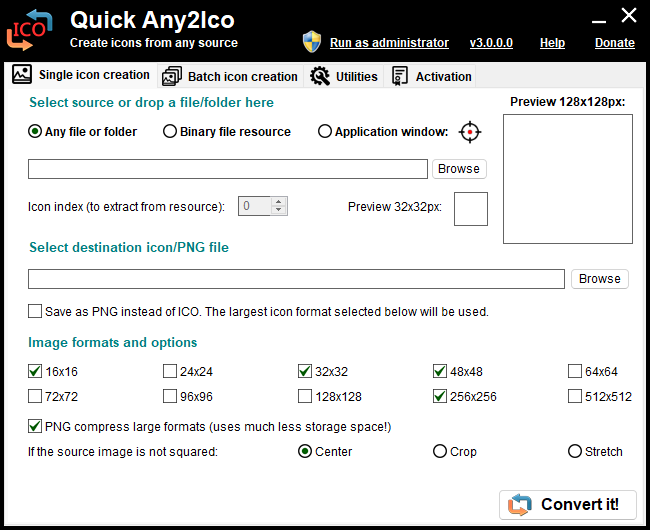
Ya da Online Web Servisi işini görür...
https://www.vecteezy.com/free-vector/software-icons
NOT : G-mail ile kolayca üye olabilirsiniz.